Next.js SEO: How to Optimize Your Next.js Site for Search Engines

Understanding Next.js SEO (What It Is and Why It Matters)
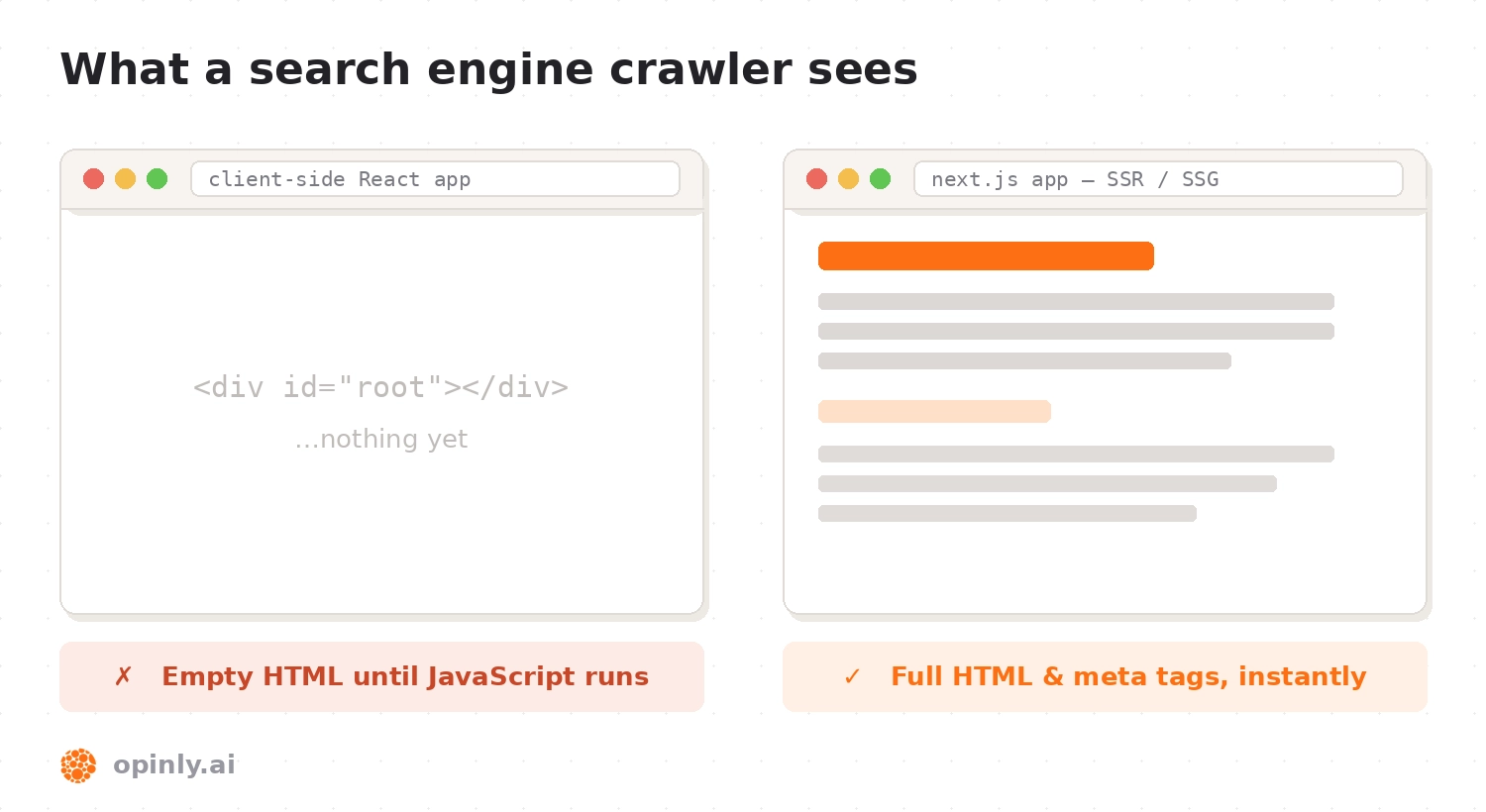
Next.js SEO refers to the practice of optimizing a website built with the Next.js framework so that it ranks higher on search engines. SEO (Search Engine Optimization) is all about improving your site's visibility on Google and other search engines by making it easier for their crawlers to find, index, and understand your content. Next.js is a popular React framework that offers features like Server-Side Rendering (SSR) and Static Site Generation (SSG) which can greatly benefit SEO. Unlike a traditional React app, which renders content on the client side, Next.js can pre-render content on the server, ensuring that search engine bots see fully formed HTML instead of a blank page. This means Next.js can overcome many of the SEO challenges that standard client-rendered React apps face.
In short, Next.js SEO involves leveraging Next.js features and best practices to make your site more discoverable and appealing in search results, resulting in increased organic traffic and improved user engagement.
How Next.js Improves SEO
Next.js is built with SEO in mind, addressing several shortcomings of single-page applications.
Here are the key ways Next.js improves SEO compared to a typical client-side React app:
Server-Side Rendering (SSR) & Static Generation (SSG): Next.js can generate the HTML for your pages on the server — either on each request with SSR, or ahead of time at build with SSG. This means search engine crawlers get the actual content and meta tags without needing to run complex JavaScript. In a regular React app, the initial HTML is mostly empty and content only appears after hydration, which many bots handle poorly. By pre-rendering pages on the server, Next.js ensures crawlers can easily scan and index your content and metadata, leading to faster indexing and better visibility. This is why Next.js is often recommended for SEO-intensive projects over pure client-side rendering (CSR).
Faster Load Times and Core Web Vitals: Next.js sites tend to load faster thanks to automatic optimizations like code splitting and asset optimization. Faster sites provide a better user experience and can improve your rankings, since Google uses Core Web Vitals and page speed as ranking signals. By splitting JavaScript into smaller chunks, Next.js reduces Total Blocking Time (TBT) and speeds up First Contentful Paint (FCP). Built-in tools help too:
next/fontoptimizes custom fonts to prevent layout shifts, and thenext/imagecomponent automatically resizes, compresses, and lazy-loads images for faster delivery.Built-in SEO-Friendly Features: Next.js provides out-of-the-box tools for the important SEO elements. The Metadata API (App Router) makes it easy to set unique titles, meta descriptions, canonical tags, and Open Graph tags for each page — statically via a
metadataexport, or dynamically withgenerateMetadata(if you're still on the Pages Router, the<Head>component does the same job). Clean, declarative URLs come from file-based routing, encouraging SEO-friendly URL structures (e.g./blog/how-nextjs-improves-seorather than hash or query-based routes) that can positively impact click-through rates and are easier for Google to understand. The<Link>component prefetches linked pages, speeding up navigation — not directly a ranking factor, but a smoother user experience. And the<Script>component lets you control how third-party scripts load (e.g.strategy="lazyOnload"), preventing heavy scripts from blocking rendering.
In summary, Next.js improves SEO by combining server-side rendering for crawler access, performance optimizations for speed, and developer-friendly APIs for managing SEO content. This solves the classic SEO issues of client-rendered SPAs — slow loads and invisible initial content — and provides a solid foundation for building search-friendly websites.
Next.js SEO Best Practices: How to Optimize Your Next.js Site
Using Next.js gives you a head start on SEO, but you still need to apply best practices to fully optimize your site. If you're wondering how to optimize SEO in Next.js, focus on the following key areas:
Choose the Right Rendering Method (SSR/SSG/ISR): Use Server-Side Rendering or Static Site Generation for all public, indexable pages so content is pre-rendered. Static Generation is ideal for content that doesn't change often (like blog posts or marketing pages) because it produces ultra-fast pages at build time — Google can crawl these easily and users get instant responses. If your content updates frequently, use SSR so crawlers always see fresh content without a rebuild, or use Incremental Static Regeneration (ISR) to periodically refresh static pages. The main point: avoid pure client-side rendering for pages that need to rank, because it serves an almost empty page to crawlers.
Define Unique Metadata for Every Page: Ensure every page has a compelling
<title>(with relevant keywords used naturally) and a descriptive meta description that invites clicks, plus Open Graph tags for consistent social sharing. In the App Router, use the Metadata API; on the Pages Router, use<Head>. Skip<meta name="keywords">— search engines have ignored it for years. Don't forget canonical tags: if the same content is accessible via multiple URLs (query params, alternate paths), set a canonical URL — via thealternates.canonicalfield in the Metadata API — to consolidate SEO signals and prevent duplicate-content issues. Add robots directives to mark any pages you don't want indexed (internal search results, admin pages) withnoindex, configurable per page in the metadata config. And embed structured data (Schema.org): JSON-LD can enhance how your listings appear in search (rich snippets) — for a blog, addArticleschema with author, publish date, and so on via a<script type="application/ld+json">block. This helps search engines understand your content and improves your chances of rich results.Use Semantic HTML: Write your JSX with proper semantic elements —
<header>,<nav>,<main>,<article>,<section>,<footer>, and headings<h1>–<h6>in logical order. Semantic HTML gives structure and meaning to your content, which helps crawlers interpret the page hierarchy, and it improves accessibility too. Next.js doesn't change how you write HTML, but always prefer semantic tags over a div soup.Optimize Images and Media: Large, unoptimized images slow down your site, hurting both user experience and SEO. Serve images through
next/imageinstead of raw<img>tags — it handles resizing for different screens, compression, modern formats like WebP and AVIF, and lazy-loading automatically. Include descriptive alt text for every image (for accessibility and image search). Optimized media improves Core Web Vitals such as Largest Contentful Paint, which in turn boosts SEO performance.Improve Page Performance: Beyond images, use
next/fontto self-host fonts and avoid layout shifts, enable gzip or Brotli compression on your hosting, and keep pages lean by importing heavy libraries only where needed (Next.js code-splits automatically). Avoid heavy third-party scripts, or defer them with<Script strategy="lazyOnload">. Monitor your Core Web Vitals with Google Lighthouse or PageSpeed Insights — Next.js makes good scores easier to achieve, but developer diligence is still required.Leverage XML Sitemaps & Robots.txt: A sitemap helps search engines discover all your pages. In the App Router, Next.js can generate these natively — add a
sitemap.tsandrobots.tsfile to yourappdirectory and Next.js serves them at/sitemap.xmland/robots.txt. On older setups, thenext-sitemappackage does the same at build time. Make sure dynamic routes like blog posts are included. Sitemaps and robots.txt don't directly boost rankings, but they improve crawlability, which is fundamental to SEO. (Tip: if you use a platform like Opinly for your blog, it auto-generates a combined sitemap including all blog posts, so no content is missed.)Ensure Mobile-Friendliness: Mobile usability is a significant SEO factor, and Google indexes mobile-first. Build with responsive design in mind, use fluid layouts, test on real devices, and lean on
next/image's automatic responsive sizing. A well-optimized responsive page that meets Core Web Vitals thresholds is all you need — there's no reason to reach for AMP anymore.
By following these best practices, you cover the technical SEO basics for a Next.js application: server-rendered, fast-loading pages with proper metadata, which is exactly what search engines love. Now let's look at one of the most powerful ways to boost SEO on any website — adding relevant content via a blog.
Adding a Blog to Next.js for SEO
One of the most effective strategies to improve SEO on your Next.js site is to add a blog. Fresh, high-quality content is a magnet for search traffic: each post gives you an opportunity to target new keywords and provide valuable information that can rank. A marketing site alone might only rank for your brand name and a handful of product terms, while every blog post adds indexable pages aimed at real questions your audience is searching for. Over time, a blog establishes your expertise on topics related to your business and drives a steady stream of organic visitors.
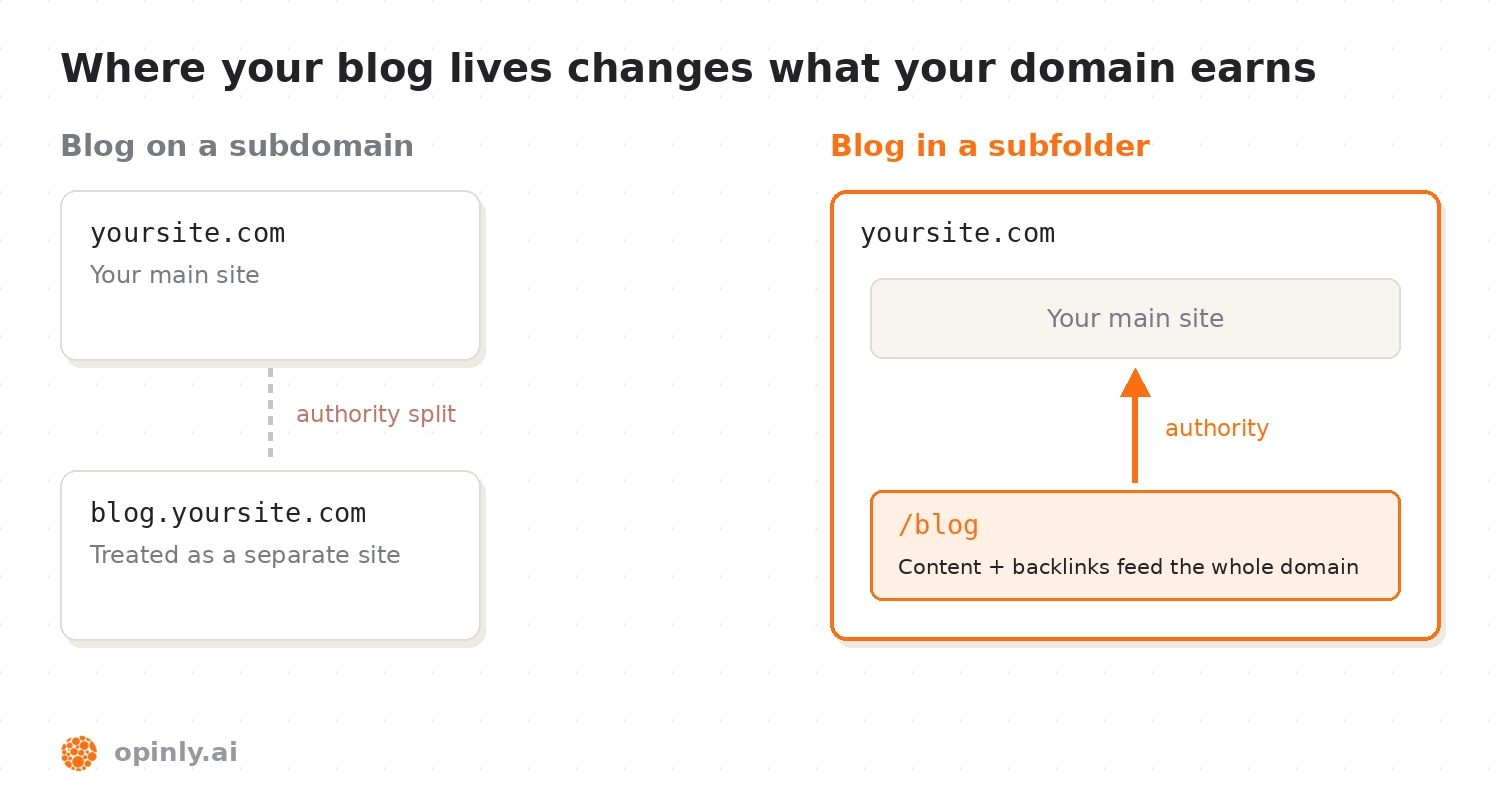
Beyond publishing content, where the blog lives matters. Hosting the blog at yourwebsite.com/blog means all that content — and any backlinks it earns — directly benefits your main domain's authority. Search engines may treat a subdomain like blog.yourwebsite.com as a separate site, so content and links there don't fully feed back into your main domain, and SEO practitioners have long argued over subdomain vs. subfolder for exactly this reason. Bottom line: if SEO is a priority, put your blog inside your Next.js app under the main domain, not on a separate site.
How to Add a Blog in Next.js (Options)
Adding a blog to Next.js can be done in several ways, each with its own trade-offs:
DIY with Markdown/MDX: Since Next.js supports static generation, you can build a simple blog by writing posts in Markdown or MDX and generating a page per post. This keeps everything in-house and leverages Next.js for excellent performance and SEO, since posts are pre-rendered as HTML. However, maintaining content in code becomes cumbersome as you scale, especially if non-developers need to publish — there's no editor or scheduling, and every new post means a commit and a deploy.
Headless CMS or External Blog Platform: A headless CMS like Prismic, Contentful, Sanity, or Strapi gives writers a friendly interface, while Next.js fetches and renders the content on your site for SEO. You could also run WordPress or Ghost — either headless via their APIs, or hosted separately on a subdomain. The headless route keeps the blog on your main domain but requires extra setup and usually a subscription. An external platform on a subdomain is easiest initially, but as noted above, it splits your SEO efforts.
Next.js Blog Integrations (Opinly, etc.): A newer option is a dedicated blog integration for Next.js. Opinly's Next.js SDK, for instance, embeds a full-featured blog directly into your app in a single short setup — no CMS to build, no content pipeline to maintain. Your posts live at
yourdomain.com/blog, arrive as fully rendered pages that search engines can crawl and index straight away, and inherit your site's own look and feel. Every technical SEO chore from this guide is handled for you automatically: each post ships with the right titles, descriptions, canonical and social-sharing tags, structured data for rich results, and inclusion in your sitemap and RSS feed — so nothing on the checklist above depends on anyone remembering to do it. And because the writing side is a hosted platform, your team gets an online editor, scheduled publishing, and AI-assisted drafting: marketers publish without a developer, and developers never touch the blog again after setup. (Disclosure: as the creators of Opinly, we built it to simplify Next.js blogging and SEO — but the general principle applies whatever solution you choose.)
Here's how the three approaches compare at a glance:
DIY (Markdown/MDX) | Headless CMS | Integrated platform (e.g. Opinly) | |
|---|---|---|---|
Setup effort | Build it all yourself | Moderate — model content, wire up fetching | One short setup |
Editor & scheduling | None — every post is a commit and deploy | Yes | Yes, plus AI-assisted drafting |
Blog on your main domain | Yes | Yes | Yes |
Metadata, structured data & sitemap | You build and maintain them | You wire them up per template | Handled automatically |
Ongoing developer involvement | Every post | Occasional | None after setup |
Internal Linking and Content Strategy: Once your blog is running, interlink your content. Blog posts should link relevant keywords back to your product or key pages where appropriate — this passes link equity and helps Google understand how your pages relate. Keep a consistent posting schedule too: search engines crawl your site more frequently once they learn your content updates regularly, and a steady cadence compounds your keyword coverage month after month. Over time, a Next.js blog full of quality articles becomes an SEO engine, pulling in visitors 24/7 and funneling them to your business — just make sure you're tracking which posts actually earn that traffic so you can double down on what works.
Pro Tip: For a detailed breakdown of the pros and cons of each approach — DIY, headless CMS, and integrated solutions — see our guide on How to Add a Blog to Next.js.
Conclusion
Next.js removes the biggest SEO obstacle that plagues React apps — invisible, client-rendered content — but the framework alone won't rank your site. The winning formula is straightforward: pre-render every public page with SSG, SSR, or ISR; give each page unique metadata, canonical URLs, and structured data; keep Core Web Vitals healthy with next/image and next/font; expose a sitemap and robots.txt; and then feed the machine with consistent, high-quality content on an on-domain blog. Get those fundamentals right and your Next.js site will have everything search engines need to find, understand, and rank your content. Increasingly, the same fundamentals also decide whether AI assistants like ChatGPT cite you in their answers — if that's on your radar, see our guide to generative engine optimization (GEO).
Get started with Opinly to put your traffic on auto-pilot
Don't wait for the perfect moment. Start building your SEO and LLM presence today with Opinly.